#93 - The return of the Palm Pilot and 3 methods to reduce your time on social networks
Greg Taieb · · 3 min read
📞(Re)discovers the ancestor of the smartphone
I talked a little in my article on taking of note of the way in which I fell into digital note-taking in the early 2000s with the purchase of my first Palm pilot.
For the youngest readers of this newsletter, Palm Pilots were personal assistants, that is to say devices which made it possible to have one's diary, contacts and notes accessible on the move.
To synchronize the data you had to connect everything to a PC but before the appearance of the smartphone it was the only way to use applications on the move.
And besides, if you want to see what you've escaped and where we're starting from, you can now use the Palm and hundreds of applications and games from your browser via The Internet Archive.
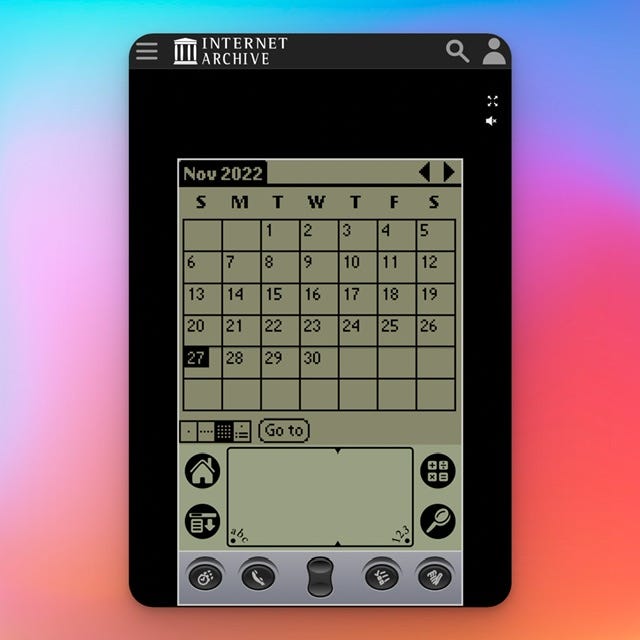
A history of mobility which served as the basis for everything we use today (diary, notes, etc.) which you can now test from your smartphone.
⌛How to really spend less time on social networks?
Do you find that you still spend too much time on social networks ?
I've worked on myself quite a bit over the last few years and here are the best techniques from the simplest to the most hardcore. The idea each time is to add friction to make opening an application as painful as possible.
The choice is yours!
Option #1: the soft method
Simple to implement and quite effective, you just need to delete the application from your phone. The immediate effect is the disappearance of notifications and the famous dose of dopamine that they generate with each interaction.

This of course does not prevent you from accessing social networks but you have to open the browser each time and type in the address. In short, it's longer and less intrusive.
Option #2: the “Time blocking” method
This second method has the advantage of facilitating awareness and being integrated into your phone. On iPhone, for example, you can limit the time spent on social networks using the screen time menu. You set a time limit on the applications you want to block and activate it.

Once the daily limit is reached, the apps are disabled and you must enter a code to continue using them. As a bonus, you have a weekly summary which shows you your total consumption. A good way to be aware of the time spent on the different applications.
Option #3: the nuclear option
If none of the previous solutions have worked for you, I have what you need. It takes a little longer to set up but effectiveness is guaranteed! And given the time you will save, the investment will quickly pay off.
This application, available only on iOS, relies on shortcuts. Shortcuts are these little automations that you can program on your phone (eg: launch Waze and Spotify as soon as you are connected to your car's Bluetooth). This application called “One Sec” will annoy you but it is devilishly effective.
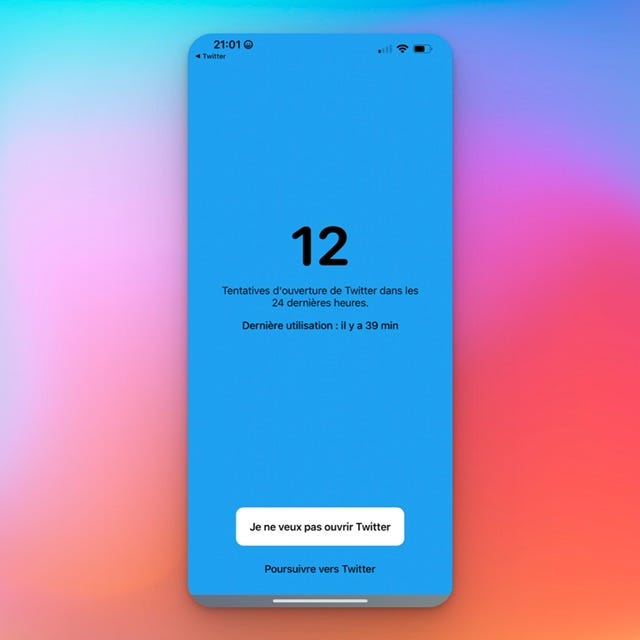
Concretely each time you try to open a social network this application will open and make you wait 6 seconds (the duration is configurable) before explicitly asking you if you want to open the application. The icing on the cake One Sec will tell you how many times you have accessed the social network in the last 24 hours. Just what you need to feel miserable.
And you, have you set up routines to limit your use of social networks?
Well I hope that with all the time saved you will dive into my archives to read all the newsletters that you missed or listen to some podcasts.
See you next week!
And that's it for this week!
If this newsletter interested you you can: