I turned my site into a city so people could get lost in it
More than one hundred and fifty articles arranged in a list tell a chronology. The same content transformed into districts tells a territory. Here is why I created the Map and how it works.
Greg Taieb · · 7 min read
A blog almost always resembles a newspaper. The latest article arrives at the top, the previous ones move down, and after a few weeks older content disappears behind pagination.
That behaviour makes sense when someone comes for what is new. It makes much less sense when a site contains nine years of articles, tests, podcasts and projects.
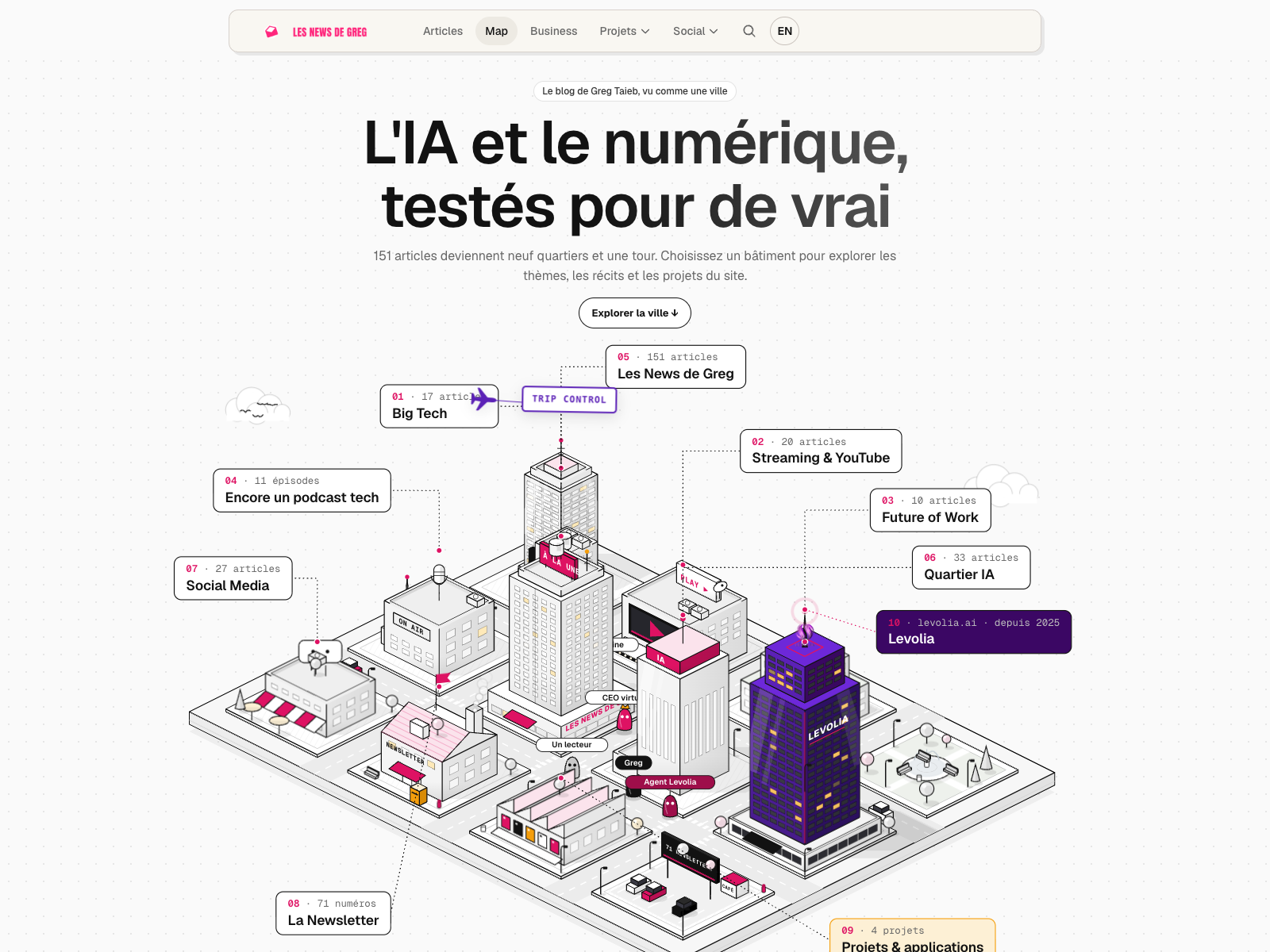
I wanted to try something else: to stop presenting the blog as a stack of texts and turn it into a place. It became the Les News de Greg Map, an interactive city in which each district represents one of the site's themes.
The problem was not organising the articles
The site already has everything needed to find content: columns, topics, search across articles and projects, and a homepage that highlights the latest publications.
The problem was elsewhere. A list answers “what has just been published?” very well. It is less good at answering “what is this site really about?”, “which subjects have returned for several years?” or “where can I go if I do not have a precise search in mind yet?”
Looking through the archive, I saw natural groups emerge: Big Tech, streaming, the future of work, the podcast, AI, social media, the newsletter and applications. Alongside them, Levolia and my projects formed another part of the landscape.
A tree structure classifies. A map makes you want to see what lies behind the next building.
The city grew from that idea. Categories became districts. Levolia became a purple tower. Applications occupy their own zone. And an aeroplane pulls a Trip Control banner above everything, because an overly serious city would have missed the point.
An entry point for visitors who are not searching for anything
Search is perfect when you already know what you want. The Map addresses the opposite moment: when you are curious but have no query in mind.
You can select the AI District, discover the articles that live there, then move towards the applications. You can open the Encore un podcast tech building, find its episodes, then follow Rémi through the city. You can also select the Levolia tower and understand how the business side connects with the blog's field notes.
This journey is not more efficient than a list. It is deliberately less direct. It adds serendipity: the chance to encounter content you would never have thought to search for.
That is why I kept the site's standard navigation above the Map. It remains an alternative route, not a compulsory toll gate. Anyone who wants the latest articles can keep reading them. Anyone who wants to wander can enter the city.
The city also tells the story of how an article is made
I did not want merely to place labels on buildings. The Map had to reflect the blog's promise: testing AI and digital tools for real.
Greg, the small black character, therefore follows a seven-stage journey:
- test for real;
- identify what works;
- understand what gets in the way;
- explain how to use it tomorrow;
- publish the article;
- send the newsletter;
- share it.
Other residents have their own roles. Rémi moves around the podcast. A reader joins the newsletter. The magazine and virtual CEO represent the AI agents whose construction I described. The Levolia agent travels between the tower and the different districts.
This is not a real-time dashboard. The phrase “editorial simulation” is deliberate: the movements make the site's operation visible; they do not claim to show people actually connected that very second.
Technically, it is not an image
The entire city is drawn in SVG. Buildings are made from polygons placed on an isometric grid. This keeps lines sharp at every screen size and makes every building genuinely interactive.
When the page loads, a JavaScript runtime builds the scene:
- it generates roads, buildings, windows, labels and residents;
- it associates each district with its links, topics and articles;
- it animates movement with
requestAnimationFrame; - it manages day and dusk, pause, speed and the detail panel;
- it adapts the framing to mobile screens and respects the system preference for reduced motion.
The React page then adds the site's live layer. The total article count comes directly from the editorial catalogue. The Podcast district calculates its episodes from publications carrying that topic. The Projects district links to Trip Control, Hiku, Client Signal and the social dashboard.
In other words, the illustration and the data are separate. The shape of the city remains stable, but its counters, links and some panels evolve with the content. When an article is added, the displayed total changes without manually redrawing the map.
Why SVG rather than a 3D scene?
I could have used WebGL or a 3D engine. The result might have been more spectacular, but also heavier, harder to make accessible and less consistent with the site's editorial identity.
SVG offers a good compromise here: it creates visual depth without turning the visit into a video game. Buildings remain document elements, links remain real links, and the whole experience stays usable with a keyboard or on a touchscreen.
The biggest task was not drawing the buildings. It was tuning the interactions: preventing a hover from making the whole map flash, distinguishing a simple pointer pass from a panel locked by a click, keeping touch targets large enough on mobile and not overwhelming the visitor with animation.
How the Map changes the way I see the site
Once the content is placed in space, some things become obvious. The newsletter occupies a central position because it runs through the site's entire history. The AI district is dense, but it does not exist alone: it touches work, applications and social media. Projects are not a separate showcase; they extend the subjects tested in the articles.
This representation replaces no data. It only changes the question asked of the visitor. The homepage asks: “what do you want to read now?”. The Map asks: “where would you like to go?”
I find that second question more welcoming for an old editorial archive. An article from 2021 may remain relevant, but it will never naturally appear ahead of this week's publication. In a city, it retains an address.
An experience, not a new menu
I will keep improving the Map: making the districts richer, bringing more projects forward and creating bridges between articles that share an idea without belonging to the same section.
But I do not want it to become an exhaustive interface. Its value also comes from simplicity. It gives an impression of the territory, then lets each article do its job.
The web has become very efficient at taking us exactly where we ask to go. It can still give us the pleasure of getting a little lost.